


klaro.legal mini podcast
IRS Filing Season Statistics, 2026
What is Your W-2 Form and Why It Matters
Your W-2 form is your annual wage and tax statement that shows exactly how much money you made and what taxes came out of your paycheck. Think of it as your year-end report card from your employer.
Percentage of Workers Who Understand Each W-2 Section
Source: AARP Financial Security Study & IRS Taxpayer Advocate Service 2024
klaro.legal
W-2 Form Basics
Your employer sends you a W-2 by January 31st if you earned more than $600. It's a one-page summary of your pay and taxes for the whole year. You need it to file your tax return.
Why Your W-2 Determines Your Refund
Box 2 on your W-2 shows how much tax your employer already sent to the IRS for you. If they sent too much, you get money back. If they sent too little, you owe. That's basically how refunds work.
Who Receives a W-2 Form
If you're an employee, full-time, part-time, or seasonal, you get a W-2. Freelancers and independent contractors get a 1099 instead. Multiple jobs? You'll get a separate W-2 from each employer.
Employer Legal Obligations
Your employer must send your W-2 by January 31st. If they're late, they face penalties up to $280. Haven't received yours by mid-February? Call the IRS at 800-829-1040.
Complete W-2 Box Guide (Boxes 1-20)
Your W-2 has 20 numbered boxes. Sounds like a lot, but most people only need to understand about 6 of them. Here's what each group means.

Income and Withholding Boxes (1-6)
These are the big ones. Box 1 is your taxable income (usually less than your gross pay because pre-tax deductions are subtracted). Box 2 is the federal tax your employer withheld. Boxes 3-6 cover Social Security and Medicare, your employer handles most of this automatically.
Tips and Benefits Boxes (7-12)
Box 7 is for tips. Box 10 covers employer childcare assistance. Box 12 is the tricky one, it uses letter codes for things like 401(k) contributions (Code D) and health insurance costs (Code DD). More on those codes below.
Special Situations Boxes (13-16)
Box 13 has checkboxes for special situations like retirement plan eligibility. Box 14 is a catch-all for extras like union dues. Boxes 15-16 are your state tax ID and state taxable wages.
State Tax Information Boxes (17-20)
Box 17 shows state income tax withheld. Boxes 18-20 cover local taxes, only relevant if your city charges income tax (like New York City or Philadelphia). You need these for your state tax return.
Understanding W-2 Box 12 Codes
Box 12 uses letter codes that confuse almost everyone. Here are the ones that actually matter for most people.

Most Common Box 12 Codes
Code D: your 401(k) contributions. This is the most common one. Code C is for life insurance your employer provides over $50,000. Codes E and F cover other retirement plans like 403(b).
Retirement and Savings Codes
Code G is for 457(b) plans (common for government workers). Code S covers SIMPLE retirement plans. These codes track your retirement savings and help lower your taxable income.
Health and Transportation Codes
Code DD shows how much your employer-sponsored health insurance costs, but don't worry, this is just informational and not taxable. Code W is for HSA contributions. Code AA is for Roth 401(k) contributions.
Newer and Special Codes
Code BB covers Roth 403(b) contributions. Code EE is for Roth 457(b). If you see codes you don't recognize, don't panic, most are informational and your tax software handles them automatically.
How to Calculate Your Tax Refund from W-2
Here's the simple version of how your refund works, it's really just basic math once you know where to look.
What Creates Your Tax Refund (Average $3,200)
Source: IRS Statistics of Income 2024
klaro.legal
Basic Refund Calculation Method
Take Box 2 (federal tax withheld). That's what your employer already paid to the IRS for you. If that's more than what you actually owe, you get the difference back. Example: $4,000 withheld minus $3,200 owed = $800 refund.
How Deductions Affect Your Refund
Your actual tax bill depends on your income after deductions. The 2026 standard deduction is $16,100 (single) or $32,200 (married filing jointly). These reduce your taxable income, which can bump up your refund.
Calculating with Multiple W-2 Forms
Got multiple W-2s? Add up all Box 1 amounts for total income and all Box 2 amounts for total withholding. Since each employer withholds taxes assuming it's your only job, having multiple jobs often means a larger refund.
Other Factors Affecting Your Refund
Tax credits can boost your refund significantly, like $2,000 per child for the Child Tax Credit. Life changes (marriage, new baby, buying a home) also affect your final number.
Common W-2 Mistakes and How to Fix Them
About 8.2 million W-2 forms contain errors every year. Here's what to watch for.
Name and Social Security Number Errors
Your name and Social Security number must match your Social Security card exactly. Even using 'Bob' instead of 'Robert' can delay your refund. Always double-check these first.
Wage and Tax Calculation Errors
Compare Box 1 to your last paystub of the year. Box 2 should match your year-to-date federal withholding. If the numbers don't add up, contact your employer before filing.
Box 12 Code Errors
Box 12 codes are often wrong or missing. Check that your 401(k) contributions (Code D) match your records. If something looks off, ask HR before you file.
How to Get W-2 Corrections
Found an error? Contact payroll right away, they'll issue a corrected W-2c form, usually within 2-4 weeks. Don't file your taxes until the correction arrives. If your employer won't cooperate, call the IRS at 800-829-1040.
W-2 vs 1099: Key Differences
Not sure if you should have a W-2 or a 1099? The difference matters a lot for your taxes.
Employee vs Independent Contractor Status
W-2 = employee (your company controls when and how you work). 1099 = independent contractor (you control your own schedule and methods). About 3.4 million workers are misclassified annually.
Tax Withholding Differences
W-2 employees get taxes taken out automatically each paycheck. Your employer also pays half of your Social Security and Medicare taxes. 1099 contractors pay the full 15.3% themselves and must make quarterly estimated tax payments.
Business Deduction Differences
The upside of 1099? You can deduct business expenses, home office, equipment, travel. W-2 employees have very limited deduction options. This can significantly lower a contractor's tax bill.
Quarterly Tax Payment Requirements
1099 contractors must pay estimated taxes four times a year (January 15, April 15, June 15, September 15). Miss these deadlines and you'll face penalties, even if you'd get a refund when you file.
When and How to Get Your W-2
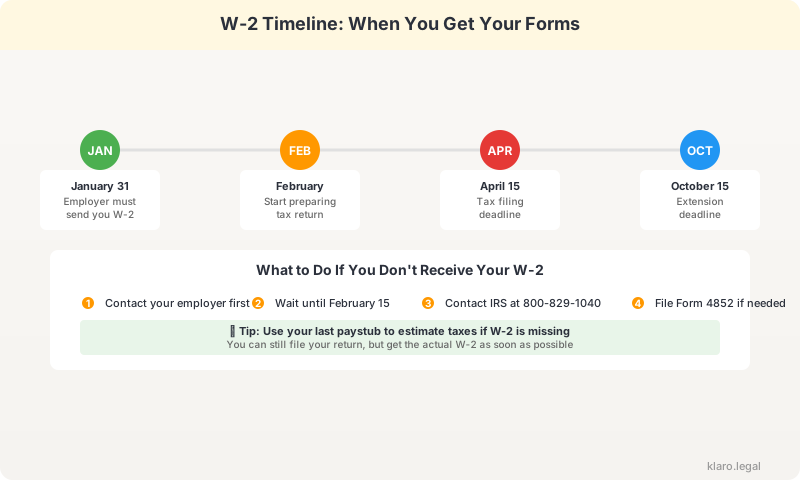
Your W-2 should arrive by January 31st. Here's what to do if it doesn't, or if you want it sooner.
Legal Filing Deadlines for Employers
January 31st is the legal deadline for employers to provide your W-2. Late penalties range from $60 to $280 per form. Your employer's delay is never your problem with the IRS.
W-2 Delivery Methods and Requirements
Most employers offer W-2s by mail, email, or online portal. If nothing arrives by February 15th, call the IRS at 800-829-1040 with your name, SSN, and employer info.
Online W-2 Access and Security
Big employers usually offer W-2 access through payroll systems like ADP, Paychex, or Workday. Download your copy right away, some portals remove access after you leave the company.
Options When Your W-2 is Missing
Still missing your W-2? Three options: contact your employer for a duplicate, call the IRS, or file Form 4852 (a substitute W-2) using your last paystub. The IRS will investigate non-compliant employers.
What to Do After Reading Your W-2
Got your W-2? Great. Here's what to do next.
Organize All Tax Documents
Gather your other tax documents: 1099s, mortgage statements, donation receipts, and health insurance forms. Having everything in one place makes filing much smoother.
Choose Appropriate Tax Software
If your income is under $79,000, you can file for free through the IRS Free File program. More complex returns might need TurboTax or H&R Block. Many programs can import your W-2 data directly.
Verify All Numbers Before Filing
Before you hit 'submit,' make sure Box 1 and Box 2 match what's in your tax software. A simple typo can delay your refund by 4-6 weeks.
Plan Your Tax Strategy for Next Year
Getting a big refund? That means you gave the government an interest-free loan all year. Consider adjusting your W-4 so you keep more money each paycheck instead.
State W-2 Boxes Explained
Boxes 15-20 on your W-2 deal with state and local taxes. Here's what you need to know.
State Tax Identification Numbers
Box 15 shows your employer's state tax ID. If you worked in multiple states, you might see multiple entries or get separate W-2s for each state.
Why State Wages Differ from Federal
Box 16 (state wages) often differs from Box 1 (federal wages) because states have different rules about what's taxable. Use Box 16 for your state return, not Box 1.
State Tax Withholding Calculations
Box 17 shows state taxes withheld. Live in Florida, Texas, or Washington? This box will be blank, those states have no income tax. High-tax states like California and New York will show a significant amount.
Local Tax Reporting Requirements
Boxes 18-20 are for local income taxes. These only apply if your city charges income tax (like NYC, Philadelphia, or Detroit). Box 20 names the specific taxing authority.
Digital W-2 Access and Security
Most employers now offer digital W-2 access. Here's how to use it safely.
Online Portal Security Best Practices
Use a strong, unique password and enable two-factor authentication. Avoid accessing tax documents on public Wi-Fi. Always check for 'https://' in the URL.
Digital W-2 Download and Storage
Download your W-2 right away, some employer portals remove access after you leave. Save copies in at least two places: your computer and cloud storage.
Mobile Access and Apps
Payroll apps like ADP, Paychex, and Workday let you view your W-2 on your phone. Handy for quick viewing, but download important documents to a secure location too.
Paper vs Digital W-2 Considerations
Both paper and digital W-2s are equally valid for the IRS. Digital versions are faster to get and easier to import into tax software. Paper versions are a good backup.